How to Design a High-Converting Paywall for Your App
1. The paywall is the most valuable screen in your app
Most teams treat the paywall as a pricing page — a necessary evil at the end of onboarding. That is the wrong mental model. The paywall is a conversion screen, and it is the single biggest revenue lever you will ever touch, because every install passes through it and the gap between average and excellent design is enormous.
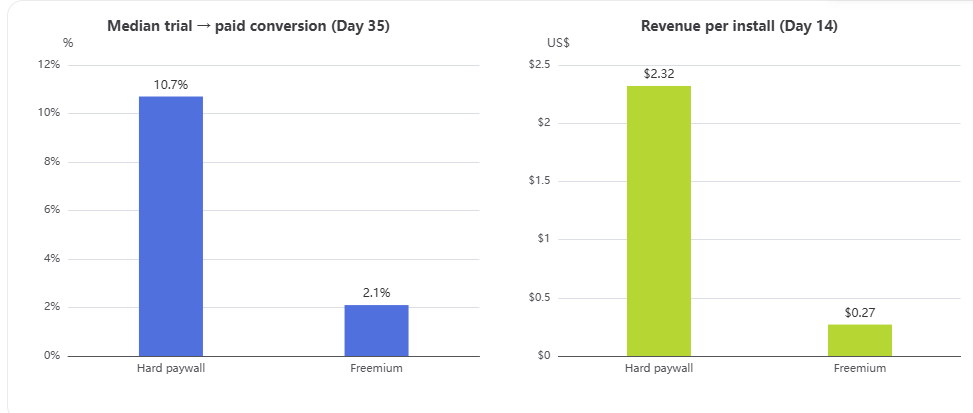
Large-scale industry data (covering 115,000 apps and over 1 billion transactions) shows that hard-paywall apps convert a median of 10.7% of trial users to paid by Day 35, versus 2.1% for freemium apps — roughly a 5× advantage — and generate about 8× higher revenue per install by Day 14 ($2.32 vs $0.27).
Just as important: the spread within the same model is huge. The top quartile of hard paywalls converts about 20% of trials, and the top 10% reaches 38.7%. In other words, execution can multiply your subscription revenue by 2–4× without a single change to your product — only to your paywall.
2. First decision: hard paywall or soft paywall?
Before touching pixels, choose your monetization model. It changes everything downstream.
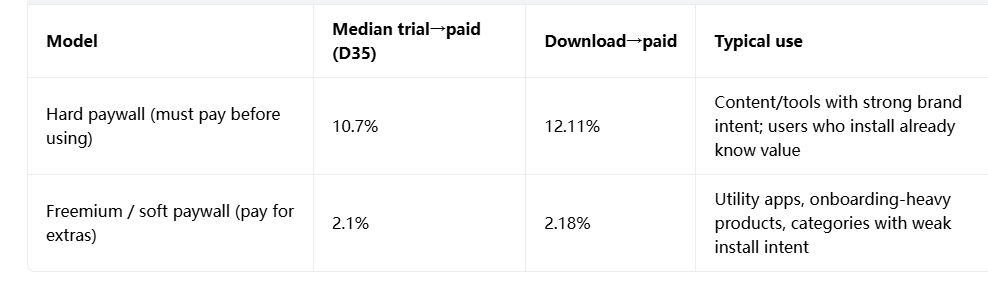
Hard paywalls convert far better per visitor, but they cost you installs: trial-start rates drop and uninstall rates after the paywall rise, because you are asking strangers for money before they feel value. Freemium earns a much bigger funnel but converts a tiny slice — in the median app, roughly 1 in 48 free downloads becomes a paying customer.
Category norms matter too. On a paywall-view basis, soft paywalls convert 4.85% of viewers versus 3.34% for hard paywalls. Meanwhile, trial-to-paid runs from 48.7% in Travel to 43.8% in Media & Entertainment, where the value is immediate and time-sensitive.
Rule of thumb: if users can feel value in the first 60 seconds, use a soft paywall or trial-first flow; if your product is a known quantity (strong brand, high-intent ads, specialized tool), a hard paywall can be your highest-ROI screen.
3. The five levers that actually move conversion
These are the levers with the strongest, most replicated evidence behind them.
Lever 1 — Pricing architecture: anchor, frame, pre-select
- Show the savings. Price anchoring — displaying "Save 60%" next to the annual plan — is the most reliable lift in paywall testing, averaging +14–22% conversion.
- Pre-select the annual plan. Defaulting to annual raises annual-plan adoption by 20–40% — most users accept the default.
- Reframe the price. Present the annual price as a monthly equivalent ("$1.92/week" instead of "$99.99/year") — the same money, but one feels disposable and the other feels like a decision. Displaying the annual plan as a monthly equivalent lifts trial starts +28% and conversion +12%.
- Use a decoy. A three-tier layout (with a mid-tier that frames the flagship as obviously better) adds +8–16%.
Lever 2 — Trial design: make it prominent and make it safe
- A prominently featured free trial is the single biggest trial-start lever, worth +34% in trial starts.
- Length pays. Across apps, 38% of trial starters convert; top-quartile apps with trials longer than 4 days convert over 60%.
- Disarm the #1 objection: being charged silently. Copy like "We'll email you 2 days before your trial ends" converts higher, not lower — you are removing the fear of being trapped.
Lever 3 — Trust: social proof, clarity, localized pricing
- Social proof (ratings, review quotes, user counts) adds roughly +4–9% in controlled tests, with some A/B studies reporting 15–25%.
- Show "Cancel anytime" / "No commitment" above the fold, and spell out the exact price ("$9.99/month", not "$119.88/year hidden in terms").
- Localize pricing and language by market. Localization wins about 62.3% of paywall tests — the highest win rate of any test category, and often the cheapest reliable lift for global apps.
Lever 4 — Copy: sell the outcome, not the upgrade
- Headlines that state the user's specific outcome ("Your meal plan is ready — unlock full macro analysis") beat "Upgrade to Premium."
- CTA copy matters: "Try Free for 7 Days" consistently outperforms "Subscribe" or "Continue."
- Speak the user's language, not sales language. A crypto app that framed its promo as "Buy The Dip" — an insider tip its audience already understood — beat its own generic "50% OFF" sale by 20%+ (see case study below).
Lever 5 — Layout: put the button where the thumb is
- The subscribe button belongs in the bottom third of the screen, where thumbs rest — not buried under a scrollable feature list most users never scroll.
- Keep your brand's visual language; a paywall that looks like an interruption converts worse than one that looks like part of the product.
4. Case studies: what moved the needle in the real world
Crypto portfolio tracker (fintech) — Original promo paywall converted at 2.7%; a redesign with a visual price chart, "SALE" urgency callout, "Back to $15.99/month" anchoring, and insider-style copy ("Buy The Dip") lifted conversion to 3.24% — a 20%+ improvement with zero product changes.
Finch (self-care app) — Used a three-screen sequence: first value (what you get), then safety (explicit trial-reminder promise), then urgency (limited-time bonus) — each screen removes one specific objection before the next.
The common thread: none of these wins came from new features. They came from offer architecture, framing, trust signals, and relentless iteration on the paywall itself.
5. Study real paywalls before you design — PaywallHub
You should never design a paywall in a vacuum. PaywallHub (paywallhub.pro) is a professional research platform built exactly for this: it maintains a massive, continuously updated database of thousands of app paywall examples across every category, and it organizes them around the decisions that matter — pricing models, trial strategies, UI patterns, and real conversion data.
Three ways to use it in your workflow:
- Reverse-engineer your category. Before sketching anything, browse paywalls from apps in your category (fitness, productivity, media, etc.). Note how leaders handle plan tiers, trial messaging, and trust elements — then use those patterns as your baseline, not your final design.
- Mine it as an inspiration engine. When your tests plateau, pull screens from top-growth apps outside your category and adapt their framing (e.g., a meditation app's urgency mechanic may transfer to your finance app).
- Learn from indie developer case studies. PaywallHub's case study section features real stories from independent developers who turned ideas into thriving businesses — the closest thing to honest post-mortems you'll find, and often more candid than enterprise marketing case studies.
Treat PaywallHub as your reference library, and your own A/B tests as the only source of truth for your audience.
6. Build an experimentation loop — then never stop
A great paywall is never "designed once." It is an evolved artifact of testing. The evidence shows which tests pay off most often: localization wins 62.3% of tests, trial structure 59.6%, plan duration 58.7% — all structural decisions that beat pure copy/color polish.
Practical loop:
- Instrument the funnel: paywall view → trial start → paid (D35). You cannot optimize what you cannot see.
- Test one structural variable at a time (default plan, trial length, pricing anchor) before cosmetic ones (color, wording).
- Give tests enough volume and time — conversion differences of 1–2 points can be the difference between 2.7% and 3.2% and need statistical confidence, not vibes.
- Segment by acquisition channel and market — organic users convert meaningfully higher than paid users, and local pricing is often the cheapest reliable lift.
The 10-point paywall checklist
- Model chosen deliberately: hard vs soft paywall vs trial-first, matched to your category.
- Annual plan pre-selected by default; monthly available one tap away.
- Savings % shown next to the annual price (anchoring).
- Annual price framed as a monthly or weekly equivalent.
- Free trial featured prominently; trial reminder promise in copy.
- Social proof visible: rating, review quote, or user count.
- "Cancel anytime / No commitment" above the fold; price stated plainly.
- CTA says what the user gets: "Try Free for 7 Days."
- Outcome-based headline, in the user's own language.
- Localized price, currency, and copy per market — and a live A/B testing loop on top.